Top 5 Rescue Disk To Repair your Infected computer
 A Rescue operation can not be complete without the use of appropriate tools. The Rescue of computers require the use some important tools which are listed below with there use. Choose your tool wisely and start you rescue operation..
1. Kaspersky Rescue Disk 10
Kaspersky Rescue Disk is designed for testing and treatment of infected computers. The application is used when it is not possible to cure your computer with antivirus applications or utilities of treatment (eg, Kaspersky AVPTool), run under the operating system. The effectiveness of treatment is enhanced by the fact that in the system are malicious programs do not receive control during system startup. The program is an iso-image multiboot disk. To work with him, you need to burn an ISO image to CD disc, then insert the disc in CD-ROM, and boot from it.
Also Read How to Use Kaspersky Rescue Disk 10? (future Post)
Click to Download.
2.Trinity Rescue Disk
Trinity Rescue Kit or TRK is a free live Linux distribution that aims specifically at recovery and repair operations on Windows machines, but is equally usable for Linux recovery issues. Since version 3.4 it has an easy to use scrollable text menu that allows anyone who masters a keyboard and some English to perform maintenance and repair on a computer, ranging from password resetting over disk cleanup to virus scanning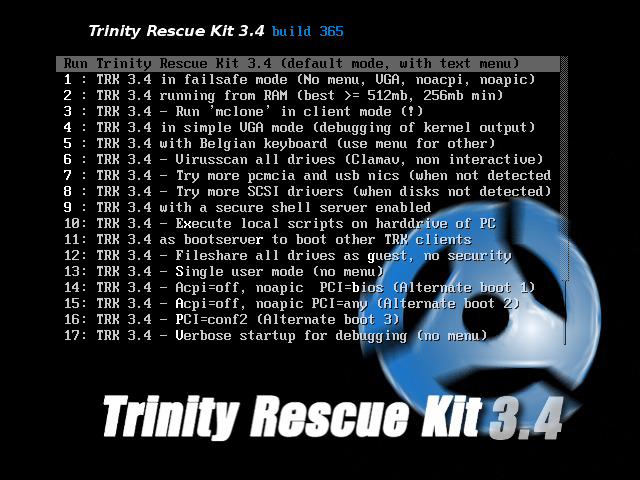
It is possible to boot TRK in three different ways:
-as a bootable CD which you can burn yourself from a downloadable isofile or a self burning Windows executable
-from a USB stick/disk (optionally also a fixed disk), installable from Windows or from the bootable TRK cd (which is easier and safer)
-from network over PXE: you start 1 TRK from CD or USB and you run all other computers from that one over the network without modifying anything to you local network.
Ever since version 3.4, TRK has received an easy to use textmenu but has equally kept the commandline.
Also Read How to Use Trinity Rescue disk? (future Post)
Click to Download.
3. AVG Rescue Disk
The AVG Rescue CD is provided in two versions: an ISO image that can be easily burned to an optical disc (CD), or a compressed version that can be installed to a bootable flash drive (USB). Once this is done, you can simply boot from the drive of choice directly to the AVG menu, where you can scan for viruses, edit files, test your drive, or even edit the registry. You can also access a number of common Linux tools to make changes to your system.
Also Read How to Use AVG Rescue Disk 10? (future Post)
Click to Download.
4. Avira Rescue Disk
Avira Rescue Disk is a free bootable antivirus rescue disk to clean virus from your computer without booting your operating system first. Avira Antivirus rescue disk is definitely one of them to remove virus under clean and safe operating system environment. The offline scan of the Avira Antivirus Rescue CD can also be used to examine an infected computer. This helps to detect malware, spywares before it gets active or before it is difficult to remove once the operating system is active. Stealth viruses no longer remain hidden: The Rescue System blocks the disguised harmful programs providing a clean operating system.
However, Avira Antivir Rescue Disk is similar like most of bootable Rescue CD builds developed under Linux Live CD distribution whereby it can load a simple operating system without writing any system files on your hard drive. Beside that, Avira AntiVir Rescue System is updated several times a day (contains the current virus definitions VDF) so that the most recent security updates are always available.
Also Read How to Use Avira Rescue Disk 10? (future Post)
Click to Download.
5. Panda SafeCd Rescue Disk
Panda SafeCD is a free utility to disinfect any Operating System. Simply burn into a CD or USB and boot your PC with Panda SafeCD to scan and disinfect your PC. This useful utility comes in handy when you need to clean a friend's PC (or your own) from a malware infested state. It is specially useful for detecting and disinfecting malware infections which give regular AV products running within Windows a hard time.
Features include: -Automatic detection and removal of all types of malware. -Boot from CD or USB stick. -Supports using updated signature files. -Supports 13 languages. -Supports both FAT and NTFS drives. The download consists of an ISO. You can either burn this into a CD/DVD or alternatively create a more convenient Boot USB stick by using something like the Universal Netboot Installer (UNetbootin).
Also Read How to Use Panda Rescue Disk 10? (future Post)
Click to Download.
Have fun.. and Protect your PC for free with these Free Rescue Disks.
 A Rescue operation can not be complete without the use of appropriate tools. The Rescue of computers require the use some important tools which are listed below with there use. Choose your tool wisely and start you rescue operation..


